


I was excited to host Hugo in our course for a talk. I’ve followed his content for a long time and gotten so much value from his work. He’s a data and AI consultant who has worked with teams at Netflix, Meta, and the Air Force, and he hosts the excellent Vanishing Gradients podcast, which covers everything from AI developments to building LLM applications [00:21-00:47].
So I was thrilled to finally collaborate and have him share his hard-won insights with us. Hugo’s talk was a class in building reliable AI-powered products. He presented a clear, practical framework for moving beyond flashy demos and creating systems that actually work. This is what he shared.
Hugo teaches a dedicated course on Building AI Applications for Data Scientists and Software Engineers. He’s provided a discount code for our audience, and it starts soon. Check out the course landing page for contents and syllabus.
The Trap of “Proof of Concept Purgatory”
If you’ve built with generative AI, you know the feeling. You get a flashy demo working in a few hours, and the excitement is sky-high. But then reality hits. You try to turn it into a real product and get stuck in what Hugo calls “Proof of Concept Purgatory” [03:51].
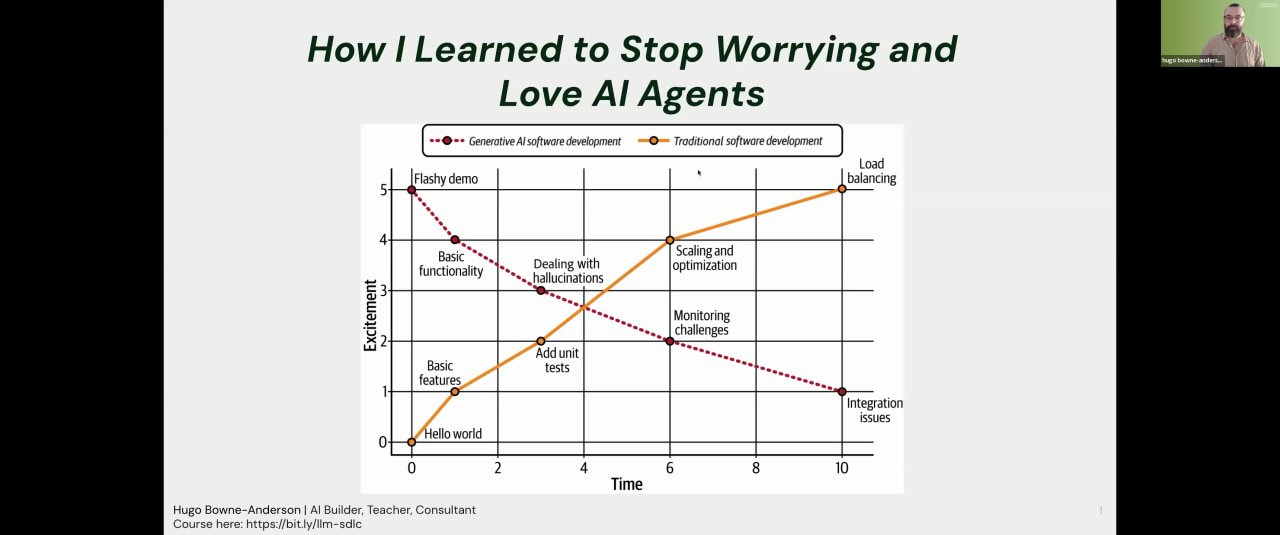
In traditional software, excitement builds slowly. You start with “hello world,” add features, write tests, and scale. Value and excitement grow together.
With generative AI, it’s the opposite. The initial excitement plummets as you wrestle with hallucinations, complexity, monitoring, and enterprise integration [04:30].
The core of Hugo’s work is helping raise the curve to keep excitement and productivity high throughout the project.
The Agentic Spectrum: A Better Way to Build
The problem often starts with how we think. We often see a binary choice: build an AI agent, or don’t. Hugo argues this is the wrong frame. Instead, we should think in terms of a gradual progression of capabilities [08:20].
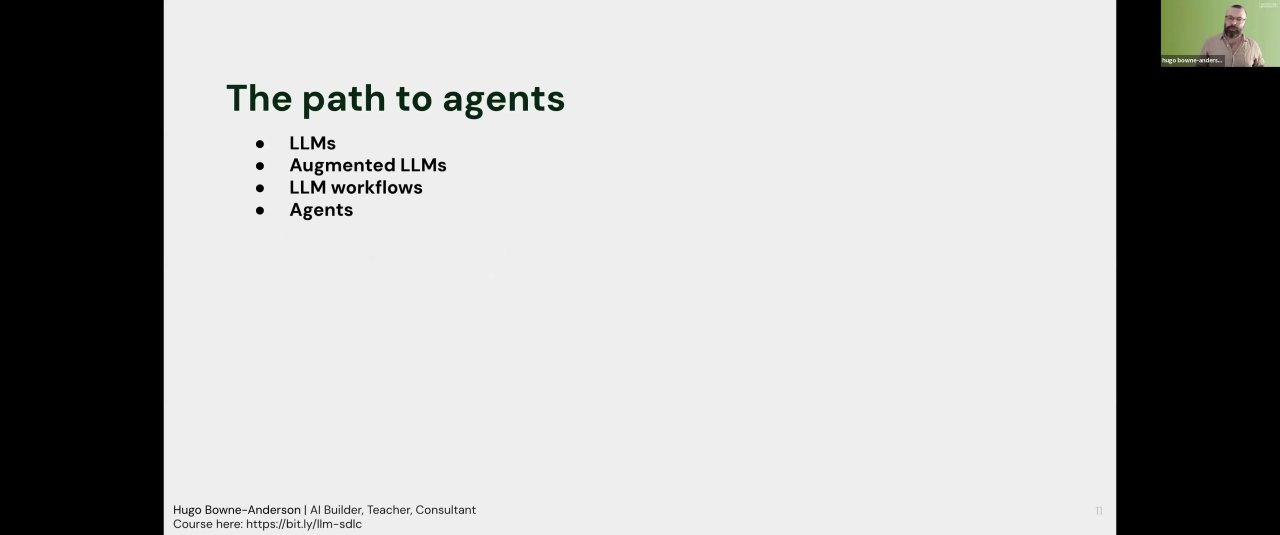
Most projects should start with simple LLMs and move progressively down the agentic spectrum when necessary.
Level 1: The Base LLM
Text in, text out. When you ping an API, it has no memory of past conversations and no ability to access external information or tools [08:33].
Level 2: The Augmented LLM
capabilities [08:20].
You augment the base LLM with foundational capabilities:
Memory: Allowing the model to remember previous turns in a conversation.
Retrieval (RAG): Giving the model access to external documents or data.
Tool Calls: Equipping the model with the ability to use external functions, like a calculator or an API.
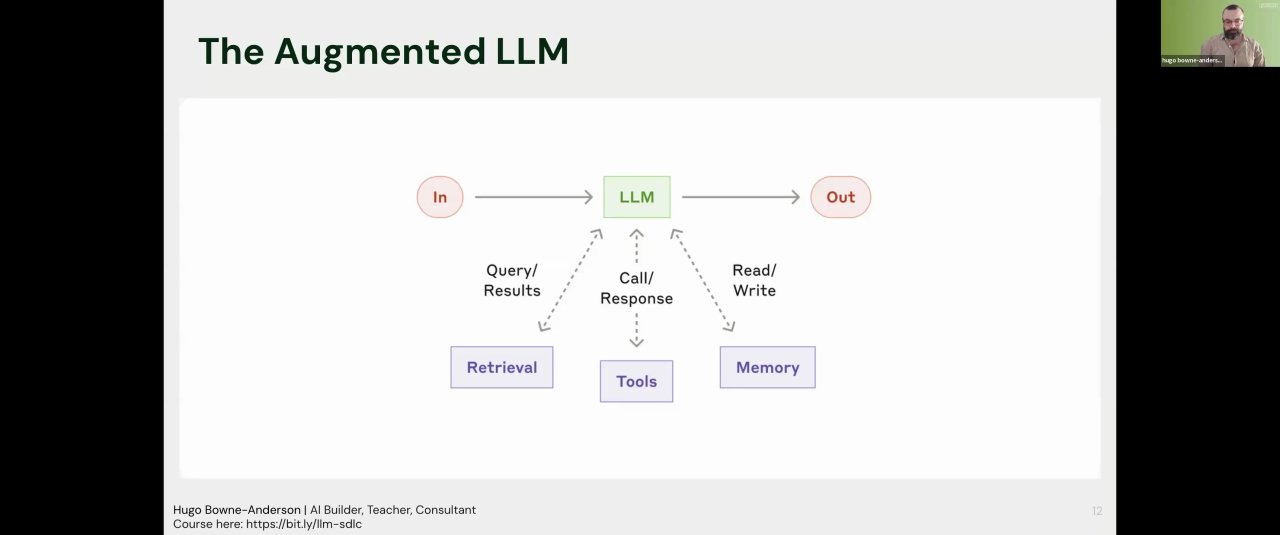
Many powerful products, like Honeycomb’s text-to-query feature, live entirely at this level. They solve a specific problem reliably without needing more complexity [09:11].
Level 3: Workflows
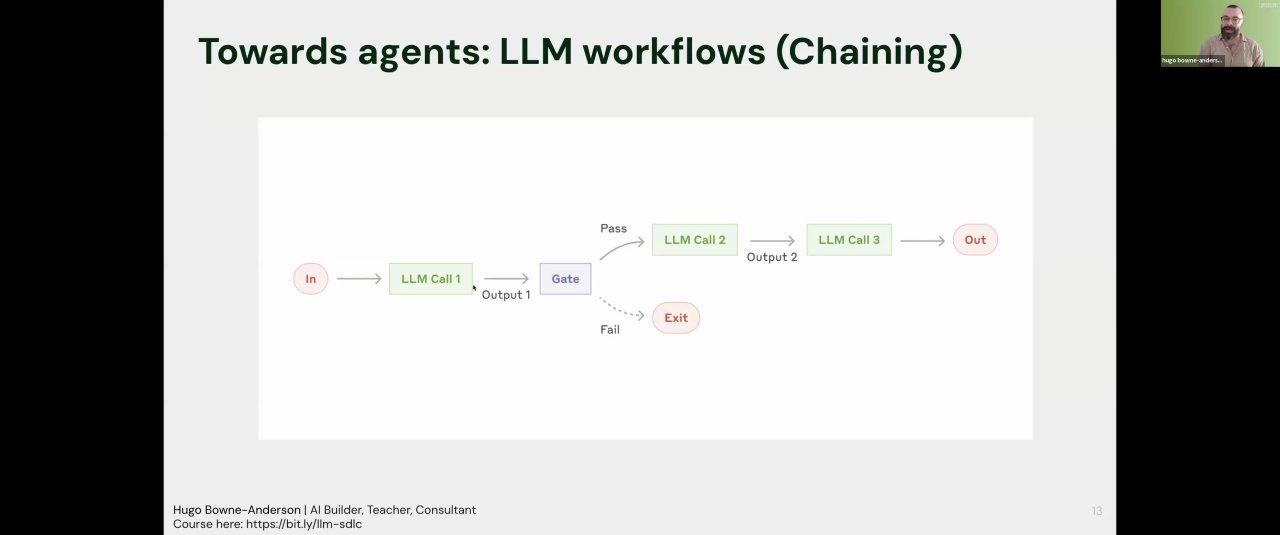
Instead of one big, complex call, you can build powerful systems by creating pre-defined pipelines of smaller, simpler LLM calls. Hugo, referencing a great post from Anthropic, outlined three key patterns [10:28].
1. Chaining: A sequence of LLM calls where the output of one becomes the input for the next. For example, a recruiting tool might have a three-step chain:
Extract: Pull structured data (name, title) from a LinkedIn profile.
Enrich: Find additional context about the person or company.
Generate: Draft a personalized outreach email.
You can place “gates” between steps to check for quality, like ensuring the first step actually produced valid JSON [11:25]. This makes the system easier to debug and evaluate.
2. Routing: Using an initial LLM call to classify a task and route it to the appropriate tool or prompt. In the recruiting example, you might route a candidate to a different email template if they are an executive versus a junior developer [12:25].

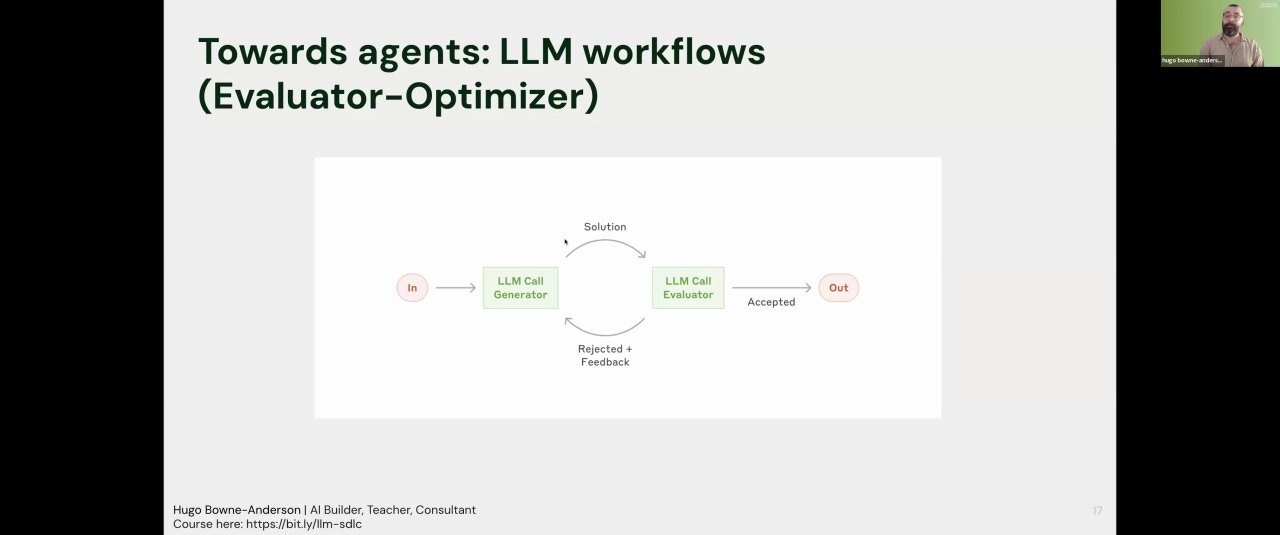
3. Evaluator/Optimizer Loop: Using a second LLM to act as a critic for the first. One LLM generates an email, and an “evaluator” LLM reviews it, providing feedback for improvement. For example, the evaluator might suggest replacing a vague “let me know if you’d like to chat” with a direct Calendly link to reduce friction [13:22].
What Really Is an Agent? (And Why You Should Be Cautious)
So if those are workflows, what is an agent? The key difference is control.
In a workflow, the developer specifies the tools that are used... whereas in an agent, the LLM output would decide it.” [14:55]
When you ask ChatGPT to create an image, no one hard-coded an if/then statement to use DALL-E 3. The model’s own output dynamically determines that DALL-E is the right tool for the job. That’s an agent [15:12].
This autonomy is powerful, but it’s also where things get brittle. Hugo demonstrated this with a multi-agent system he built using Crew AI. He gave it a clear task: perform nine distinct web searches using three different tools to compare two frameworks [19:05].
The result? The system never once performed all nine searches.
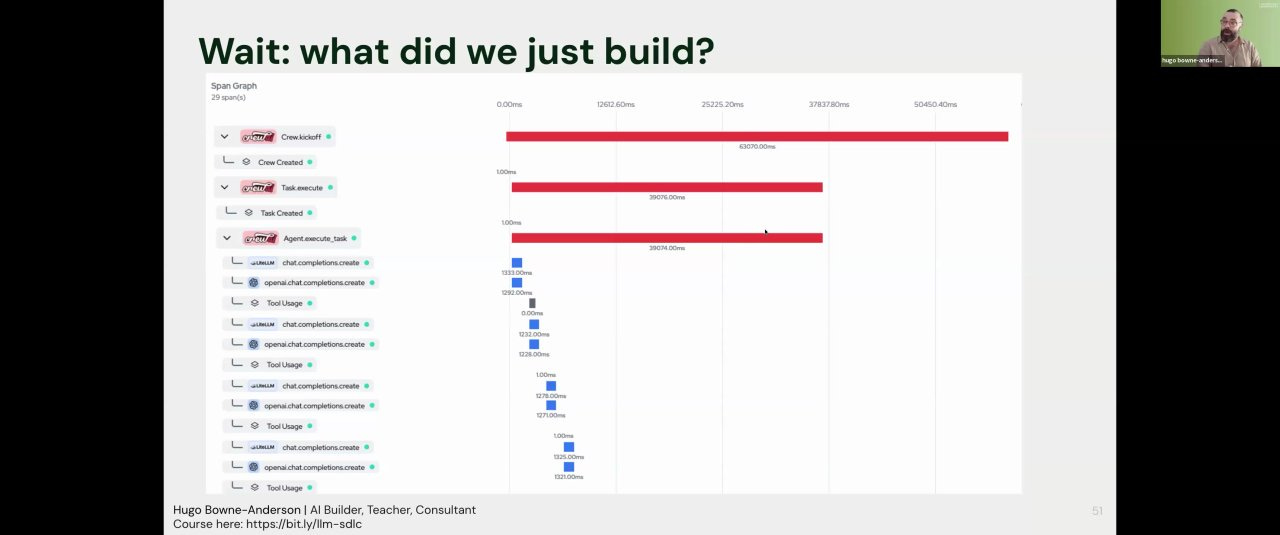
“We talk about hallucination a lot. We don’t talk about forgetting enough. I ran this a hundred times and not once did I see nine tool calls used. I think the median was five.” [20:08]
This “forgetfulness” is a common failure mode of complex agents. When you give the LLM full control, you lose reliability, and the system becomes more difficult to debug.
The Secret to Success: When to Build Agents
So, if agents are so problematic, why does Hugo admit to using them every single day? [25:53]
Strong human supervision.
He visualizes this as a matrix comparing AI Agency vs. Human Supervision [27:05].
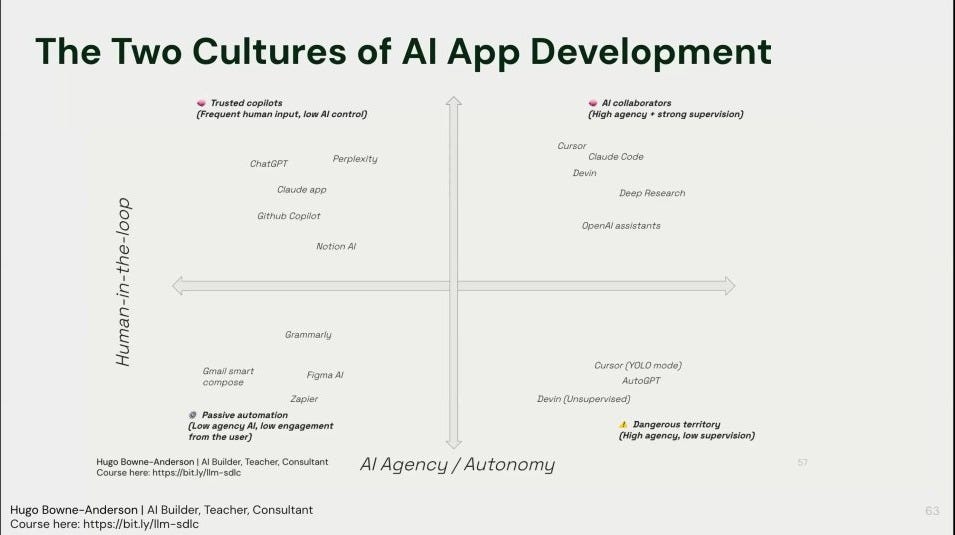
High Agency / Low Supervision (The Danger Zone): This is where you have a fully autonomous agent serving end-users, like a travel booking assistant. The user can’t be expected to supervise every step, so failures are costly and dangerous. You should avoid building these systems with today’s technology.
High Agency / Strong Supervision (The Sweet Spot): This is AI as a collaborator for an expert. Think of a developer using Cursor [27:30]. The AI has high agency to write code and use tools, but the developer is always in the loop to accept, reject, and guide its actions.
This distinction is the key. It creates two cultures of AI development:
For Production Software: Build reliable, inspectable systems using augmented LLMs and pre-defined workflows.
For Expert Tools: Build powerful, complex agents for yourself, your team, or skilled users who can provide strong supervision.
A Practical Framework for Building Reliably
The development process should be grounded in evaluation from day one [22:02].
Log Everything: You cannot improve what you can’t see. Log user prompts, LLM responses, tool calls, latency, and cost for every run [25:21].
Create a “Minimum Viable Eval Harness”: Don’t wait for a perfect evaluation suite. Start by taking 20-50 real user queries and manually labeling the desired outcome (pass/fail). This small, hand-labeled test set becomes your ground truth [23:37].
Iterate and Measure: Use this test set to evaluate every change you make (new prompt, new model, new workflow, etc.).
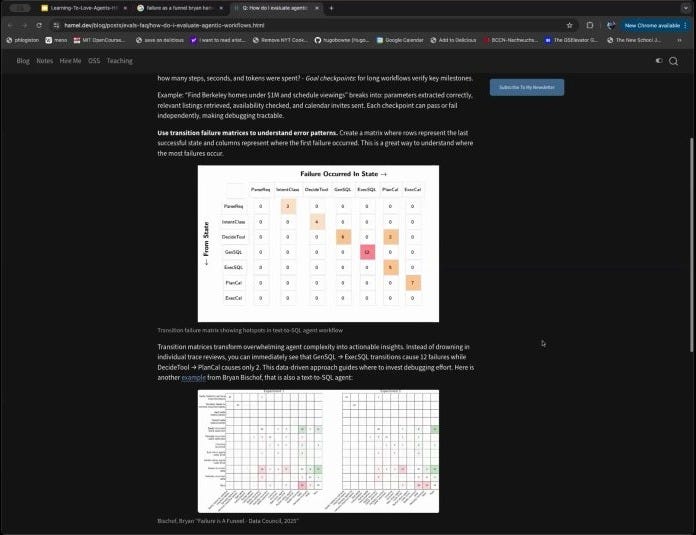
Hugo showed a method for visualizing failures using a transition matrix, which helps pinpoint which step in a multi-tool process is failing most often [50:08].
He whoed how you can identify the most common failure point in a real product with a transition matrix
Key Takeaways
Hugo left us with a clear, actionable path forward for building AI applications that deliver real value
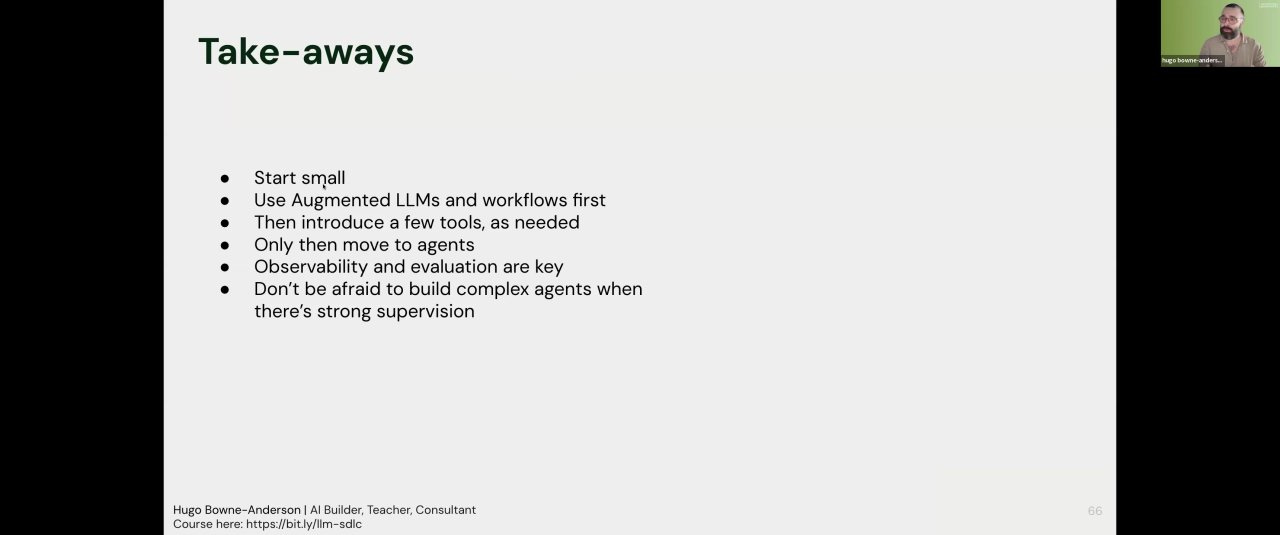
Start Small. Begin with augmented LLMs and simple, developer-defined workflows. Solve the business problem with the least complexity possible.
Make Observability and Evaluation Foundational. Build your system around logging and testing.
Embrace Agents for Collaboration, Not Autonomy. Don’t be afraid to build complex agents, but deploy them in contexts where there is strong human supervision
